


WhatsApp Business
4.656.02K Reviews
App Specs
- Version
- 2.26.27.83
- Updated On
- License
- Free
- Downloads
- 1,000,000,000+
- Developer
- WhatsApp LLC
- Categories
- Communication
- Platform
- Android, iOS
Screenshots
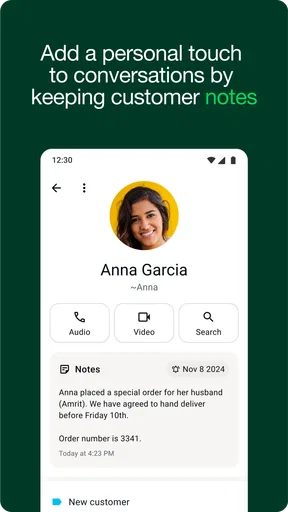

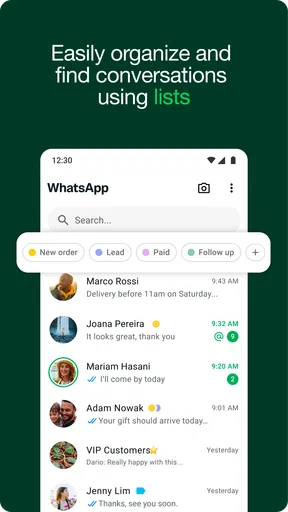
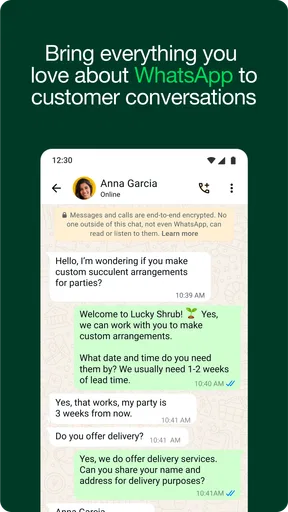
 Analysis by AppCompare
I judge a business messaging app by what happens on an ordinary busy day: can I answer a customer without losing track of family messages, and can another person in the household tell which conversations belong to the business? WhatsApp Business is useful when those boundaries are handled deliberately. It adds business-oriented tools to a familiar messaging style, but it still needs thoughtful setup and consistent habits from whoever answers.
When a household helps with customer messages
Picture a small home-based shop where one person packs orders while another handles questions. A customer asks whether an order is ready, then sends a follow-up later that evening. Labels can help the person replying see whether the chat is new, waiting on an answer, or already handled. Saved quick replies can cover routine questions, leaving the person packing free to focus on the parcel rather than repeatedly typing the same explanation.
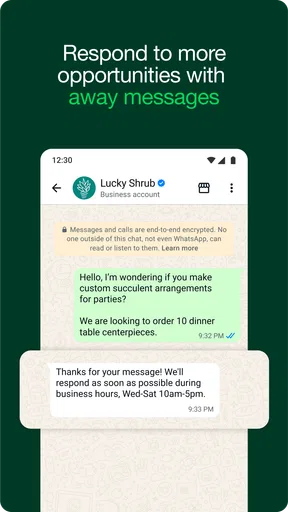
The benefit is not that the app automatically coordinates a family. It does not replace agreeing who is responsible for replies, what counts as urgent, or when the business is closed. I would settle those rules first, then use the app’s tools to support them. For example, a shared note outside the chat can identify who is covering customer messages that day, while an away message sets expectations when nobody is available.
Guides and Analysis on WhatsApp Business
Keeping personal and business identities clear
Before choosing this setup, decide which phone number and account should represent the business. A business profile can present useful details to customers, while a personal account remains a better fit for private conversations. That distinction matters in a household where a device may be passed between people: seeing a customer’s message does not mean every family member should answer it or use the business identity.
I would also agree on simple handoff habits. If someone else takes over a conversation, they should read the recent context before replying and avoid promising a delivery time or refund they cannot confirm. A quick reply is convenient, but it can sound wrong when it does not fit the question. The safest workflow is to treat saved text as a starting point, check the details, and personalize it before sending.
Coordination without turning chats into clutter
Labels are most useful when they describe an action, not just a customer type. “Waiting for payment” or “Needs follow-up” gives the next person a practical cue; broad labels can become decorative and stop helping. I’d keep the set small enough that everyone answering can apply it consistently. Then, at the end of a shift, a quick scan of unresolved labels can reveal what still needs attention.
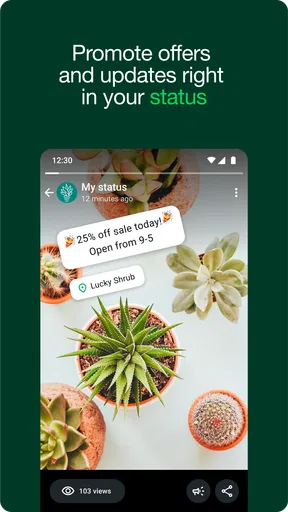
Broadcasts have a different purpose from a group chat: they let a business send an update to multiple people without putting those recipients into one shared conversation. That can be handy for a change in opening hours or a relevant announcement. I would keep such messages infrequent and useful, rather than treating the feature as permission to send every promotion to every contact. People are more likely to value an update when it answers a question they actually have.
Worth Reading Before You Choose

Switching to Android Auto Means Rethinking Your Driving Routine

Google Calendar Makes a Crowded Week Easier to Manage

Ludo King Makes the Most of the Minutes Between Plans

Baby Panda World Brings Quick Play to Modern Phones, but Its Game Library Feels Busy

ESPN’s Live Game View Makes Following Close Games Easier

QuizzLand Review: A Good Fit for Short Trivia Breaks, Not Every Player
For a very small operation, this approach can be easier to maintain than moving every customer into email or a separate help-desk tool. Email is often better when a long written record, attachments, or a formal thread matters. A dedicated support system can suit a larger team that needs assigned cases and a more structured handover. WhatsApp Business is strongest when customers already prefer direct chat and the people replying can keep the workload manageable.
Setting Up Your Business Profile
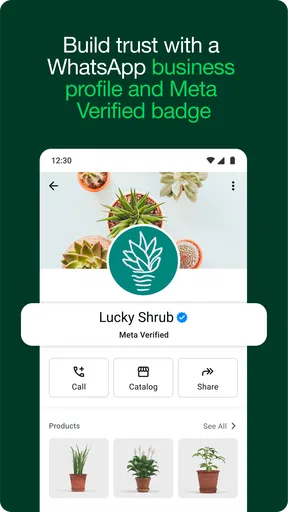
Getting started with WhatsApp Business is pretty straightforward. After downloading the app, you can set up a unique business profile. This feature allows you to include essential details like your business address, website, and a short description of what you offer. It’s like having a mini-website right in the app! I found this particularly useful for making my business look professional and trustworthy.
Communication Made Easy
The app is all about making communication seamless. With features like automated messages, quick replies, and labels, keeping track of customer interactions is a breeze. I personally love the quick replies feature. It lets you save and reuse messages you frequently send, which is a real time-saver when dealing with common queries.
Another cool feature is the ability to set up automated messages. Whether it's a greeting message for new customers or an away message when you’re off the clock, it keeps the communication lines open even when you’re not around.
Organizing Your Chats
Labels are another lifesaver. You can categorize your chats for easy access. For instance, I use labels to differentiate between new customers, pending orders, and completed transactions. This system makes it easy to find what you’re looking for without having to scroll through endless messages.
Insights and Analytics
One of the standout features for me is the simple analytics dashboard. It provides insights into message statistics, which help you understand what’s working and what’s not. It’s not overly detailed, but it gives you a nice overview of your communication trends, which is perfect for small business owners who don’t have time to sift through heaps of data.
Another benefit is the broadcast feature, which lets you send messages to multiple people at once without creating a group chat. This is perfect for promotions and updates.
Making the profile useful in practice
A profile only helps if its details answer the questions a customer is likely to ask before starting a conversation. I’d make the business description plain and specific, and check that the address and website are current before directing people there. Think of the profile as a useful introduction, not a substitute for explaining what you sell, how orders work, or when someone can expect a reply.
A practical routine is to review the profile whenever your service changes, then check quick replies and automated messages for stale details. A greeting that still mentions an old schedule can create more confusion than no greeting at all. The same goes for saved answers: keep them short, avoid guarantees you cannot consistently meet, and leave room to answer the customer’s actual question.
What the numbers can and cannot tell you
The app’s message statistics can help me notice broad communication patterns, but I would not treat a simple dashboard as a full business report. It can offer a basic sense of activity; it cannot explain by itself why a customer stopped replying or whether a promotion led to a sale. I’d pair those figures with a lightweight record of orders or inquiries if those outcomes matter to the business.
This distinction is useful for deciding whether the app still fits. If the main challenge is answering repeated questions and keeping conversations sorted, its built-in tools may be enough. If the challenge is measuring sales across several channels or assigning a large volume of cases among staff, a more structured system may be worth the extra effort. I would not add complexity before the business has a clear need for it.
Choosing it for the right kind of work
WhatsApp Business is a sensible choice for a solo seller, neighborhood service, or small team whose customers are comfortable asking questions in chat. It is also a reasonable starting point for someone who wants a professional-facing profile and reusable replies without building a complicated support process. The familiar conversation format can make quick questions feel easy for both sides.
I would hesitate if the business needs strict division of responsibility, formal case tracking, or detailed reporting across a sizable support operation. It may also be a poor fit when customers expect email, phone support, or a channel that keeps business discussions separate from their everyday messaging. In those cases, a conventional inbox or dedicated customer-service platform can make ownership and records clearer.
There is also a household trade-off: convenience can blur boundaries. If the business account is open on a device that other people use, establish who may read and respond to customer conversations. Keep personal and business discussions distinct, and do not assume that a shared device makes every account a shared responsibility. The app provides messaging tools; household members still need to agree on access and accountability.
Age, trust, and responsible use at home
The app is rated for Everyone, but that does not mean every child should manage customer conversations or be given responsibility for a business account. I would keep business replies with the adult or staff member who understands the service, customer expectations, and any commitments being made. If a young person helps with a simple task, define exactly what they may do and have an adult check replies before they are sent.
Trust also comes from restraint. Customers may share personal details while asking about an order or service, so I would only request information needed to handle that conversation and avoid copying sensitive details into casual household notes. A clear profile, a relevant answer, and a realistic reply expectation do more for confidence than sending frequent promotional messages.
Everyday handoffs and common questions
Suppose a customer messages while the person who usually replies is out collecting supplies. The away message can set a reasonable expectation, and a household member covering the inbox can use the relevant label to see whether the conversation is already in progress. Before answering, they can check the recent messages, confirm any order detail with the person responsible, and use a saved reply only if it fits. That small sequence helps avoid duplicate answers and contradictory promises.
People often wonder whether they need a separate business phone number. The useful question is whether the number and account you choose make the boundary between private and customer conversations clear for your situation. They may also wonder whether automated replies mean customers receive a complete answer while nobody is present. I treat them as acknowledgments or expectation-setters, not as a substitute for checking an order or resolving an unusual problem.
Another practical question is whether broadcasts are the same as opening a group. They serve different purposes: a broadcast can deliver an update without putting recipients together in one group conversation, while a group is for people who need to talk with one another. For a customer announcement, I’d choose the less intrusive approach and keep the message focused. If the conversation requires discussion among several people, a group or another channel may be more appropriate.
Considerations
While WhatsApp Business is packed with features, it's worth noting that it’s mostly geared towards small businesses. If you’re running a larger operation, you might find it a bit limited. Also, since it's tied to a phone number, managing it across multiple devices can be tricky.
However, for small to medium-sized businesses, it’s a fantastic tool that enhances customer interaction without being overwhelming. The intuitive interface and direct communication channel are hard to beat.
Its scale is part of the appeal: WhatsApp Business has over a billion installs and a 4.7 average from around 23 million ratings. WhatsApp LLC develops it, and the app is free to install. The age rating is Everyone, and it runs on Android 5.0 or later; the current version is 2.26.21.75. Although the app itself is free, in-app purchases are listed from about $0.29 to $2,799.99 per item, so I would check what a purchase refers to before spending anything. Those headline figures are reassuring signs of reach, but they do not tell me whether the workflow suits a particular household or business.
For me, the best test is whether customers already want to reach you through chat and whether someone can reliably own the inbox. If the answer is yes, the profile, saved replies, labels, and away messages can make a small operation feel more organized without demanding a new support system. If the business needs strict team routing or a formal audit trail, I would choose a tool built around those needs instead.
In conclusion, if you're looking for a way to enhance your business communication, WhatsApp Business is definitely worth considering. It offers a professional touch to your interactions, and the automation features are a game-changer for busy entrepreneurs like us. Give it a try, and you might just find it becomes an indispensable part of your business toolkit.
Pros
- Easy customer interaction management.
- Automated messages save time.
- Labels organize chats efficiently.
- Profile customization for branding.
- Accessible analytics for insights.
Cons
- Limited to one device at a time.
- Requires separate phone number.
- No direct payment integration.
- Limited multimedia support.
- Lacks advanced CRM features.
FAQs for WhatsApp Business
What is WhatsApp Business and how is it different from regular WhatsApp?
WhatsApp Business is designed specifically for business owners to communicate more effectively with their customers. Unlike regular WhatsApp, it offers features like business profiles, automated messages, and analytics. These tools help businesses manage customer interactions more efficiently, making it a valuable tool for small to medium-sized enterprises.
Is WhatsApp Business free to use, and are there any hidden costs?
WhatsApp Business is free to download and use. However, it’s important to note that while the app itself is free, any internet charges from your service provider will still apply. Additionally, businesses looking for advanced features may need to integrate with paid third-party services for enhanced functionality.
Can I use WhatsApp Business and regular WhatsApp on the same phone?
Yes, you can use both WhatsApp Business and regular WhatsApp on the same phone, provided you register each with a different phone number. This allows you to keep personal and business communications separate without needing a second device.
What are the key features of WhatsApp Business that benefit small businesses?
WhatsApp Business offers several key features beneficial to small businesses, including business profiles, quick replies for frequently asked questions, labels for organizing chats, and automated greeting and away messages. These features help streamline communication and improve customer engagement effectively.
How secure is WhatsApp Business for handling customer communications?
WhatsApp Business uses end-to-end encryption to protect messages, ensuring that only you and the person you're communicating with can read what's sent. This level of security makes it a reliable platform for customer communications. However, businesses must still follow best practices to maintain data privacy and security.


